
WhatsApp @all, for everyone.
Without the wall of names.
Not every group has WhatsApp's own @all, and not every member is allowed to use it. TagAll gives you the same reach: type your message, press send, and every member of the group is mentioned in that one message, with the body left exactly as you wrote it.
Free. Works on WhatsApp Web in Chrome and other Chromium browsers.
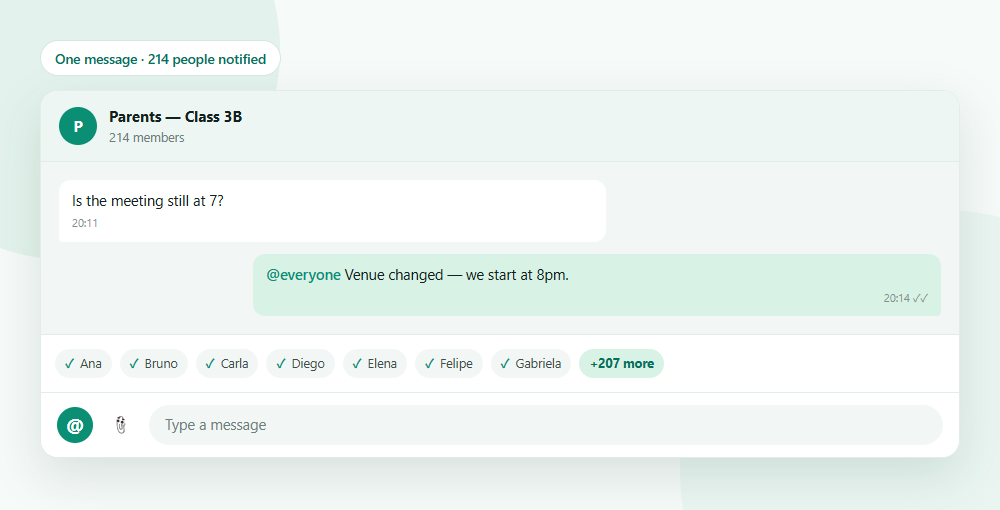
Why @all is missing from your group
WhatsApp's own group mention is not available to everyone, and the workarounds are worse than the problem.
It is gated
Availability varies by group, by account and by rollout. Plenty of groups simply do not show the command, and in many of them only admins may use it.
The manual way does not scale
Tagging everyone by hand means one picker interaction per member. In a group of a hundred, that is a hundred interactions and a message that opens with a hundred names.
Broadcast is not the same thing
A broadcast list sends separate private messages. It does not notify the group, and replies do not land in the group either.
What it actually does
Three things that matter when you have to reach a whole group.
A clean message
Your message reads the way you wrote it. Members are mentioned through the message itself, not by pasting their names into the text.
Everyone, not whoever matched
The member list comes from the group itself, so nobody is skipped because their display name is a phone number or an unusual nickname.
Processed in your browser
The extension processes group information locally and saves drafts, tasks and settings in your browser. Messages you send are shared with WhatsApp and their recipients.
Manual mentions vs TagAll
The difference is what the group actually sees.
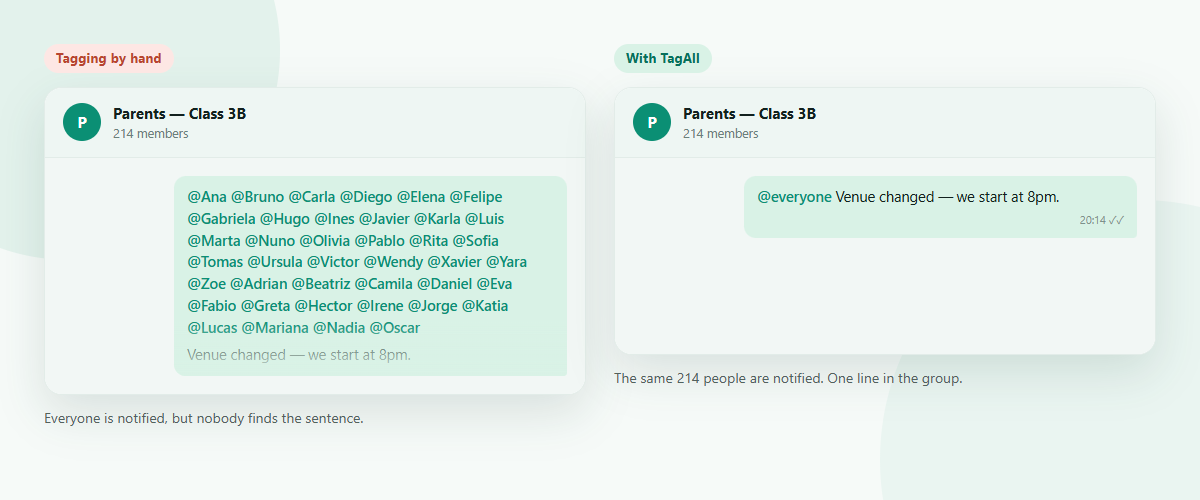
Mentioning by hand
- One picker interaction per member
- Minutes of clicking in a large group
- Members the picker cannot find are silently missed
- The message opens with a wall of names
With TagAll
- One click to insert the keyword
- One message, sent when you press send
- The list comes from the group, so nobody is missed
- The body is only what you typed
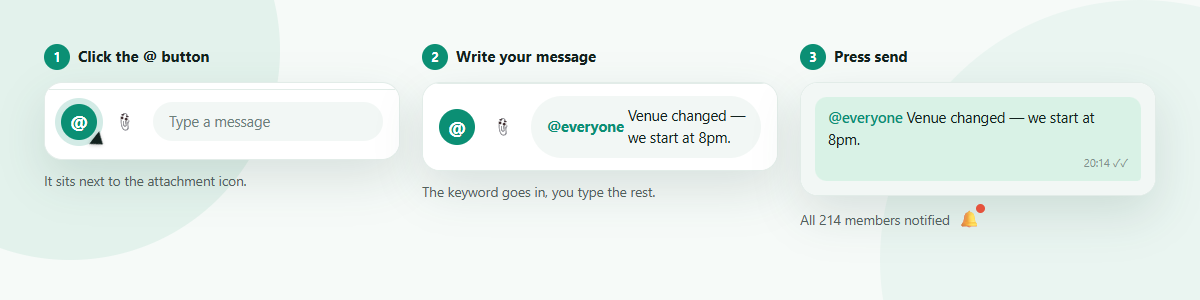
Four steps
About a minute, once.
- 1
Install
Add TagAll to Chrome. It runs only on web.whatsapp.com.
- 2
Open a group
Open WhatsApp Web and pick the group you want to reach.
- 3
Click @
The @ button sits next to the attachment icon. It inserts the keyword.
- 4
Write and send
Type your message after the keyword and press send as usual.
Who it is for
Group admins
Announcements everyone has to see, not only the people scrolling right then.
Community and sales teams
Reaching a group you take part in without being an administrator of it.
Teachers and organisers
Schedule changes, deadlines, room moves — things that stop mattering once they are missed.
Support and operations
Incident notices where a missed message costs more than a notification does.
Questions
What does TagAll actually send?
The message you typed. TagAll rewrites it so that every member of the group is mentioned, which is what triggers their notification, while the visible text stays exactly what you wrote.
Does it send anything by itself?
No. It only acts when you press send yourself, and only when your message contains the keyword. Without the keyword it does not touch your message at all.
Will this get my account banned?
TagAll sends an ordinary group message from your own account. It does not automate bulk messaging and does not message anyone outside the group. That said, unwanted mass mentions annoy people and may breach WhatsApp's terms, so use it for messages the group actually needs.
Does it work in large groups?
Yes. The member list is read from the group in one step, so a large group costs no more effort than a small one.
What data do you collect?
The WAGroup extension behind TagAll processes account and group information and stores drafts, tasks and preferences locally. WhatsApp handles messages you send; support services receive information you choose to share. See our privacy policy for details.
Which browsers are supported?
Chrome and other Chromium browsers such as Edge, Brave and Arc, on WhatsApp Web.
Why does my WhatsApp group not have @all?
WhatsApp's own @all is gated: its availability depends on the group, the account and the rollout, and in many groups only administrators may use it. TagAll does not unlock or bypass that permission. It mentions members through an ordinary message you send yourself, which is something any member can already do by hand.
What is the difference between tag all, mention all and @everyone?
They are the same idea under different names: notifying every member of a group at once. WhatsApp calls its own command @all, while people search for tag everyone, mention all and @everyone interchangeably. TagAll uses @everyone as its keyword by default, and you can change it in the extension popup.
How do I tag everyone in a WhatsApp group without being an admin?
Install TagAll, open the group, click the @ button next to the attachment icon, type your message and press send. You do not need to be an administrator: the extension mentions members the same way you could one by one, only in a single step.
Ready to reach the whole group?
Install it once, then it is one click every time.